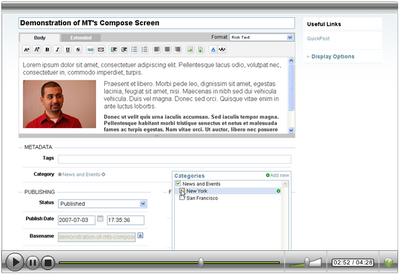
- A built-in Rich Text (WYSIWYG) Editor
- Auto Save and post recovery
- Ability to browse a library of previously uploaded images to insert them into a post
- Ability to upload images directly into a post
- A personalizable display of compose screen
- Fully integrated tags support and tag auto-completion
- A suped-up category selection control
- Post scheduling using a handy calendar pop-up
One feature that was not demonstrated was the ability to use the Text Editor buttons like bold, italics, underline for your posts formatted in Markdown, Textile and Smartpants, three markup languages that Movable Type now supports natively.


Matt Martone on July 3, 2007, 5:22 p.m. 返信
I think you all have done an awesome, awesome job! Congrats and thanks for the hard work. I am installing MT4 this weekend.
I am a typepad user and was pleased to see the addition of ‘pages,’ in the latest version on typepad. In particular, I like how I can control the URLs of my pages in typepad.
Will MT4 provide the functionality to control URLs of blog posts as typepad does with its pages?
I was hoping to see that in this demo.
Pls let me know. Great work with MT4 and thanks!
Matt Martone, www.jobsearchmarketing.com
Byrne Reese on July 3, 2007, 5:44 p.m. 返信
@Matt - Yes Movable Type allows you to specify the URL of your pages and entries. You can use “Folders” for pages and “Categories” for entries.
Matt Martone on July 4, 2007, 2:26 p.m. 返信
Great. Thanks.
Roland on August 15, 2007, 1:18 p.m. 返信
Would love to SEE the demo but on my Mac with Firefox I only see the loading placeholder and hear the sound. A pitty…
Shane Kelley on February 3, 2009, 7:34 p.m. 返信
I just signed added Movable Type today through my regular website host (pair.com)…they installed it. I work at an advanced level in photoshop but have not web experience other than blogger. I cannot see how to customize the MT template I selected….I’m wondering if the instructions are too advanced for a complete beginner. the entries I make are also not appearing after I click save and/or publish. Does anyone have suggestions where to start or where to find easy to follow instructions? (I’m on mac) Thanks!
peterstaley on March 3, 2009, 10:15 a.m. 返信
great demo. However, I haven’t been able to recreate the wysiwyg image resizing that you showed in the video. I’m using MT 4.21, and the Rich Text editor for new entries. When I insert a picture or a thumbnail, I can’t seem to resize it at all (no handles appear). Is there a setting I’m missing?
peterstaley on March 3, 2009, 10:17 a.m. 返信
Oh, and I’m using Firefox (for Windows)
larrysauer on March 23, 2009, 10:37 a.m. 返信
Hi Shane - I was wondering if you got any reply from anyone and through any channel. I have pretty much the same questions as you do and can’t find a simple answer. - Laurent
jackblack on May 4, 2009, 7:03 p.m. 返信
Hi!, I’m a newbie about movable type. I was wondering how can I customize the design of my entries? My problem is when I use the tag it links to the page that movable has created. Is there a way that I can use what I’m designing? I was not able to find documentation for this or its seems that It lack documentation.
Thanks
jackblack on May 4, 2009, 7:05 p.m. 返信
The tag was <mt:EntryPermalink>.
jackblack on May 13, 2009, 9:12 p.m. 返信
I already solve my first questions. :) But Another problem came up in my mind. I have two ENTRY ARCHIVE TEMPLATE. How can I use these template at a given scenario? The first template is Im going to use it in category/index.html. The second template is Sw/en/index.html. It seems when I customize the path of the two template both result to %-c/%-f.
lindaannash on August 5, 2009, 5:00 a.m. 返信
How do you add the description of the photo? I need the caption to go under the photo - I had it set up the way I wanted it and then upgraded to 4.3 and photos are not showing now - asset tags aren’t working. Help!
Bernadet on July 11, 2012, 12:46 p.m. 返信
I am trying to get used to Movable Type, but is still a bit difficult for me. What should I do to underline a text? Thank you in advance for the answers.
Ebenezer on August 4, 2012, 1:34 p.m. 返信
The WYSIWYG Editor is really great here. It is better than Dreamweaver which is too heavy.