Friending
The Movable Type Community Solution allows for users to manage and maintain a list of friends, or people they “follow” within a community. These friends can then be displayed on their profile.
In addition, Movable Type can also display all of the actions (see Actions) associated with a user’s list of friends. This gives administrators and designers the ability to construct an aggregated view of all of the entries created by, all of the comments posted by and all of the favorites marked by a user’s friends.
Conversely, just as Movable Type can display a list of friends, Movable Type can also display a list of people who have marked the current user as a friend, commonly referred to as “followers.”
Adding and Removing Friends
The Movable Type Community Solution comes standard with a simple profile template that will be used to display the profile of every user in the system. This profile comes complete with all of the logic necessary to display links for adding a user as a friend and removing a user as a friend.
By default, these links appear next to the user’s userpic. For example:
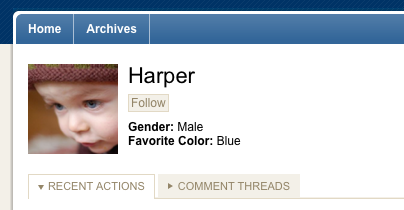
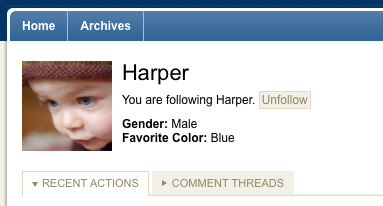
When customizing the display of your profiles, the following template tags can be used to display either the link to “follow” a user or “unfollow” a user:
- AuthorFollowLink
- AuthorUnfollowLink
Example code
<p class="edit-relation">
    <span id="following-status"></span>
    <MTAuthorIfFollowing script="0">
    You are following <MTAuthorDisplayName>.
    <MTAuthorUnfollowLink text="Unfollow">
    <MTElse>
    <MTAuthorFollowLink text="Follow">
    </MTAuthorIfFollowing>
</p>
Viewing a List of Friends
The default profile template will also display a list of friends associated with the current user/profile. This will appear in the sidebar like so:
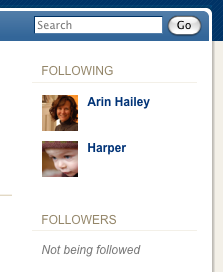
When customizing the display of this list you can use all of the template tags associated with the display of any author or user information. To iterate over a list of friends, use the following template tag:
Example
<div class="widget-following widget">
    <h3 class="widget-header">Following</h3>
    <div class="widget-content">
<mt:AuthorFollowing>
    <mt:if name="__first__">
        <ul class="user-listing">
    </mt:if>
            <li class="pkg">
                <$MTInclude module="Userpic" userpic_size="36"
                   userpic_type="userlist"$>
                <a href="<mt:var name="profile_view_url" encode_html="1"><$MTAuthorID$>"
                   class="user-name"><mt:AuthorDisplayName /></a>
                <a href="<mt:AuthorURL />" class="user-url">
                   <mt:AuthorURL regex_replace="/^\w+:\/\//","" /></a>
            </li>
    <mt:if name="__last__">
        </ul>
    </mt:if>
<mt:else>
    <p class="note">Not following anyone</p>
</mt:AuthorFollowing>
    </div>
</div>
Friending Template Tags
- AuthorFollowingFavorites
- AuthorFollowingEntries
- AuthorFollowingComments
- AuthorFollowing
- AuthorFollowers
- AuthorIfFollowed
- AuthorIfFollowing
- AuthorFollowersCount
- AuthorFollowingCount
- AuthorFollowLink
- AuthorUnfollowLink


