Motion Custom Fields
A set of entry custom fields are automatically generated when you create a new blog, choose “Motion” for a new blog’s template set, or change a blog’s template set to “Motion.”
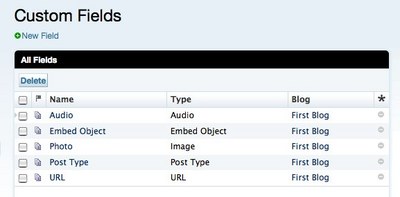
Do not delete these custom fields. Removing them from your blog will prevent you from creating entries of the custom field type that you delete.
The following table shows the custom field basename and template tags for each custom field and corresponding Entry Post type:
| System Object | Name | Basename | Template Tag |
|---|---|---|---|
| Blog Entry | Audio | audio | <mt:EntryAudio> |
| Blog Entry | Embedded Object/Video | embed | <mt:EntryEmbedCode> |
| Blog Entry | Photo | photo | <mt:EntryPhoto> |
| Blog Entry | Submission Type | post_type | <mt:EntryRawPostType> |
| Blog Entry | URL | url | <mt:EntryLinkURL> |
Be aware of the following when changing an existing blog into a Motion blog:
| Issue | Operation |
|---|---|
| There is already a field with the same “basename.” | Rename the basename of your current custom field. Keep the default values for the Motion custom field. |
| There is already a field with the same “template tag.” | Change your current custom field’s “template tag”. Keep the default values for the Motion custom field. |
We recommend using Motion template sets only with new blogs. We do not recommend adding a Motion template set to an existing blog.


