Installation & Upgrade Troubleshooting FAQ
This is the Installation and Upgrade Troubleshooting FAQ
How do I troubleshoot installation issues and errors?
- Access
mt-check.cgito be sure that all necessary and as many optional Perl modules are installed. - Check the system requirements to ensure that your system meets the minimum requirements for the version of Movable Type being installed.
- Search the forums
- Contact Six Apart or Purchase Our Technical Support Service
Where is the cgi-bin directory?
The cgi-bin directory is a folder where cgi scripts can be executed. It may be called “CGI-BIN”, “cgi”, or something like this. It will be a sibling to the web root directory where the homepage of the website goes. The web root directory may be named “www”, “html”, “publich_html”, or something like this.
Read more about the cgi-bin on the File System page.
If you’re unsure, ask your web hosting provider.
Why do I see a file starting with “!/usr/bin/perl” when I acces the application?
You are viewing the source of the cgi Perl files. Either you haven’t placed these scripts in the cgi-bin directory, or cgi files are not allowed on by your web host. Contact your web host to determine the exact cause.
File Permissions
Servers are set up in many differnet configurations. Servers with shared hosting are often more restricted in the permissions so that users do not access files of other users but dedicated servers (or virtual dedicated server) often have less permission restrictions as there are less users on them.
The elevator description on the concept of file permissions: Every user on a server has a unique username and belongs to one or more groups. Each file and directory on the server is owned by a user and a group. Additionally each file and directory has specific permissions for the owner, group, and everyone. Each of these groups is can be allowed to read, write, or execute the file or directory. Learn more about file system permissions and Octal Notation (eg. 755 or 644) on wikipedia or search for “unix file permissions”.
More info about the file system structure and directories used by Movable Type
Files and Directories Published by Movable Type
The Movable Type application is typically run by the web server user, such as “apache”. This user creates the files and directories that make up the published websites. In order to create files and directories, this user must have the necessary permissions for the directories to which files and directories can be modified.
Tip: Apache suEXEC can be configured to allow the apache user to execute files as the unix user who owns the installation.
Application Directory and Scripts
The application directory ($MT_HOME) and all subdirectories except the Static Support Directory $MT_HOME/mt-static/support and the Themes Directory $MT_HOME/themes (introduced in MT5)) should only be 755.
Note: To allow the Configuration Wizard to write the
mt-config.cgifile to the application directory, the directory must be writable by the web sever user. However because writing this file woud be the only reason that the application directory should be writable, it is recommended that the configuration file be created manually on the server or created locally and uploaded into the application directory via FTP.
The application scripts (files ending in .cgi) in the application directory should be 755.
All other files should be 644.
Note: All application scripts and directories are bundled with the proper permissions. When transferring these files via FTP sometimes the permissions of the application scripts can be changed.
Static Support Directory
Movable Type places userpics and other files in this directory. It must be writable by the web server user:
777(or-rwxrwxrwx) if the web server user is not in the group.775(or-rwxrwxr-x) if the web server user is in the group.755(or-rwxr-xr-x) if the web server user is the owner of the directory.
Themes Directory
Requires the same configuration as the Static Support Directory.
Site Root
If Movable Type will be publishing directly to the web root directory then this directory must be writable by the web server user.
Requires the same configuration as the Static Support Directory.
Changing File and Directory Permissions
Using the Command Line to Update Permissions
This command will set permissions correctly for all scripts ending in “.cgi” via command line (first cd to the $MT_HOME directory):
$ cd path/to/mt/
$ chmod 755 *.cgi
This command will set permissions correctly for the Static Support Directory via command line (first cd to the $MT_STATIC):
$ cd path/to/mt-static/
$ chmod 777 support
Note: Replace “777” with “775” based upon how the server is setup.
Using an FTP Client to Update Permissions
There are many FTP Client applications, each works a little differently but the process similar between each of them.
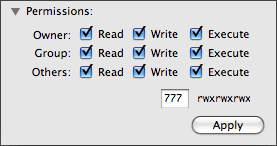
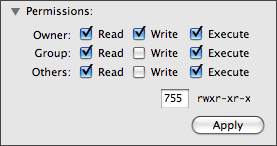
When viewing a list of the files on the server, right-click (or control-click) on a file or directory and select “File Permissions” or “Get Info” and a window will open with the ability to change permissions on the file. Change the permissions and if necessary, click “Apply”.
The window may look something like this for changing permissions:
I get “500 Error - Internal Server Error” when accessing Movable Type
This error appears in your Web browser when the Movable Type installation wizard (or any Perl script) fails to execute. Check the following:
- Use your FTP program to display the extracted Movable Type files on your local computer and the files on your Web server. Make sure that all of the files were copied.
- Check that your FTP program is set up to copy files in ASCII mode. If not, set it to use ASCII mode and re-copy the Movable Type files.
- Make sure that all of the .cgi files in the mt directory (within your server’s cgi-bin directory) have read and execute permission.
- Check that the version of Perl on your server is 5.004_4 or higher. If not, download and install a newer version.
Open the mt.cgi file and check that the path to Perl is correct for your server on the first line of the script. If not, you need to either correct this line in each of the Movable Type .cgi files or (if you have privileges to do so) make a symbolic link that maps the actual Perl directory to the one named in the Movable Type .cgi files. In a shell, enter:
ln -s actual-path-to-perl path-in-MT-cgi-fileswhere “actual-path-to-perl” is the path to the directory where Perl is installed on your server and “path-in-MT-cgi-files” is the directory where the Movable Type files are looking for Perl.
If your hosting provider is GoDaddy, you will have to edit the path in each of the files. GoDaddy’s hosting software resets the cgi-bin directory.
- If you are using a Windows server, check that you correctly configured IIS to recognize .cgi files as Perl scripts. See the instructions in Configuring IIS to Use ActivePerl.
The mt-static Directory Is Not Found or Inaccessible
The Static Directory ( named mt-static, referred to as $MT_STATIC) contains files that must be stored outside the cgi-bin directory.
If you put the mt-static directory in your server’s Web root, you can enter /mt-static as the path.
If mt-static is in a different location, enter the path to the location of the mt-static directory in the following format: http://domain-name/path/mt-static where “domain-name” is the domain name of your Web server and path is the full path to the directory in which you stored mt-static.
Test Connection to Database Fails
If the installation wizard tests the database and fails to connect, check the following and then re-try:
- Make sure you entered the basic settings correctly on the Database Configuration page.
- If your database is configured to use a nonstandard port or socket, click Show Advanced Configuration Options on the Database Configuration page and enter the appropriate settings.
- Check that the user you created to allow Movable Type access to the database has full privileges to create and modify tables in the database. For instructions, see Creating the Movable Type Database. System Administrators are often reluctant to allow this level of access, and might not give it if you do not ask for it specifically.
Permission Denied When Writing mt-config.cgi File
The Web server must have write access to the mt directory. See file permissions above.
On most UNIX/Linux systems there is a group to which the Web server user belongs. Typically it is named apache or www, but may be a custom name.
Learn how the Web server user is set up for your system and make sure that it has write access to the mt directory.
Images and Styles Are Missing
If you are able to run Movable Type, but images, styles, and behavior (javascript) appear to be missing, Movable Type is not able to access the mt-static directory.
there was probably a problem in upgrading from a previous version. Movable Type is using an outdated mt-static directory.
- Determine where you installed the
mt-staticdirectory for the current release or re-install it from the distribution files. See Select and Configure an Installation Directory. - Edit the Movable Type configuration file to eunsure the StaticWebPath directive had the correct path to the
mt-staticdirectory. - Save the
mt-config.cgifile and access Movable Type.


Phill M on November 22, 2007, 6:45 p.m. 返信
I just upgraded to 4.01 from 3.34 and I’m having a few issues. I can’t enter text in the body! I can create a title, but can’t enter anything in the body. The DISPLAY OPTIONS drop down doesn’t drop down, either. What have I screwed up?
Chris on March 16, 2009, 7:16 a.m. 返信
I am having trouble with my initial 4.x installation.
It looks like the install worked correctly, but I cannot locate the home page/landing page. There is nothing in the root directory for a landing page (i.e. index.html).
Is the index.html file somewhere else and needs to be pointed to? Right now, the admin section works fine, but users cannot access the site.
rgrace on April 19, 2009, 8:38 p.m. 返信
When you get the Permission Denied error, use the CHMOD 777 command on the usr/lib/cgi-bin/mt directory path. Then, use CHOMD 755 for the *.cgi files in the mt directory. This should get rid of the error for good and all. On Ubuntu, you won’t find an Apache or WWW user or group in the system. Like root account, I think those groups are hidden in the system for security. But the thing above fixes that on Ubuntu. H/t to Mihai Bocsaru for this tip.
Adagio on April 30, 2009, 11:56 a.m. 返信
Comment out any Suexec lines in your HTTP Server Config files - they may be scattered across directories depending on your system and setup.
Suexec simply does not work and always gives Internatl Errors in the browsers and “Premature End of Script …” errors in the log files.
Some setups like Plesk panel rewrite log files on changes and add Suexec so if you suddenly find these errors manually edit the conf files.
perlmonkey on November 19, 2009, 10:44 a.m. 返信
Being new to MT I would love to see instructions for installing Movable Type so that it makes use of multiple domains for (sub-)blogs. Maybe a pointer to the right instructions would be ok, but even better if it were to be included here ;-)
Railwayman on December 19, 2009, 2:46 p.m. 返信
Hi, had some issues with the drop down box as expressed in the above post but after some while of trying to troubleshoot the problem myself I simply reinstalled MT, now all o.k. for now.
Adagio on January 7, 2010, 4:50 p.m. 返信
Responding to PerlMonkey:
I have set up MT on multiple web sites but I did not use the virtual hosts; instead I used Apache rewrite engine and rewrite rules.
The rule files are long as I have multiple “sub-domains” and I could probably optimize to make them compact, for instance, by using rewrite maps.
If anyone wants these rewrite rules I will post them somewhere accessible.
-ad
Daniel on August 12, 2011, 8:20 p.m. 返信
Seems I have the same problem with @Chris.When I enter my site,say www.example.com,it just dont show the landing page,showing the directions Index of/ cgi-bin/ … What should I do to solve it?
Thanks.